Monday, August 6, 2012

[Inside AdSense] Join our upcoming mobile Hangouts On Air

As part of our ongoing GoMo initiative, we're hosting two more mobile Hangouts on Air to explore different mobile topics. Join us for one or both Hangouts to learn all about going mobile.

Build a business, not just an app (August 15th) on the AdMob +page
If you already have a mobile application and are interested in learning more about app monetization strategies, register here by August 10th for our 'Build a business, not an app' Hangout on August 15th at 4pm GMT/8am PDT. Whether you're an AdMob newbie or simply looking to get a refresher, this Hangout is designed to show you how to make the most out of your app. In this Hangout we'll look at:
  • App business model and promotion strategies
  • AdMob optimization tips and policy information
Creating a mobile strategy (August 16th) on our AdSense +page
Learn more about developing a mobile strategy and why it's important to create a mobile site or app to accommodate your mobile users. Register by August 10th if you're interested in joining our 'Mobile Hangout' on August 16th at 4pm GMT/8am PDT. In this Hangout we'll look at:
  • The importance of building a mobile site or app
  • Mobile site best practices
  • Where to find agencies that create a mobile site or app
  • Mobile success stories from other publishers
Once you've registered for either of the Hangouts On Air, we'll send you instructions on how to join the event.  We look forward to hanging out with you soon.

Posted by Dairine Kennedy - Mobile Team


--
Posted By Inside AdSense Team to Inside AdSense at 8/06/2012 08:30:00 AM

--
Unable to view the links or images in the message above? Want to comment on this post? Visit http://adsense.blogspot.com/ .
 
You received this message because you are subscribed to the Google Groups "Inside AdSense" group.
To unsubscribe from this group, send email to Inside-AdSense+unsubscribe@googlegroups.com
For more options, visit this group at http://groups.google.com/group/Inside-AdSense

Friday, August 3, 2012

[Inside AdSense] Ad blocking part II: Blocking unwanted ads


Happy Friday and welcome to the second installment of the ad blocking series! In our first blog post, we talked about different reasons for blocking ads and common myths about ad blocking. Today we'll discuss how to block ads you don't want to allow on your site. Once you've identified the ads you don't want to show, there are a few ways to block them: by advertiser URL, general or sensitive category (limited language availability), ad network, and individual ad creative. Below, we'll bust more myths commonly believed about blocking unwanted ads.

Myth: The 'Allow and block ads' tab of my account is the only place I can block ads.
In addition to blocking ads via the AdSense interface, you can install the Google Publisher Toolbar to block ads while viewing your pages in a Chrome browser. The Publisher Toolbar is a Chrome extension that lets you view up-to-date information about your AdSense account, offers an overview of your earnings and performance, and provides ad overlays with in-page reporting. For more details on this new Chrome extension, visit the Inside AdSense blog post.

Myth: Because the ad is an image or rich media, there's no way to find the destination URL without clicking the ad and violating AdSense policy.
As a publisher, you have a few options when trying to find out which URL you want to block:

  • If you're using Chrome, install the Publisher Toolbar extension mentioned above, which allows you to block ads as you're seeing them on your site. 
  • In your AdSense account, you can opt into the Ad Review Center where you can see all of the ads shown on your site, including text, image, and rich media ads. 

Myth: I don't see any ads in the Shown Ads tab of the Ad Review Center, but I see ads on my site. The Ad Review Center doesn't work! 
The Ad Review Center is a tool that allows you to review individual ads and choose whether or not to let them be displayed on your pages. Ads in the Ad Review Center have shown within the last 30 days. If your site has not shown any ads within the last 30 days, no ads will show in the Ad Review Center. Also, if you have very low traffic on your site, you may not see ads in the Ad Review Center. After you've submitted the request to opt in to the Ad Review Center, please allow 24 to 48 hours for ads to begin showing under the Shown Ads tab. Read more information about the new and improved Ad Review Center in our previous Inside AdSense blog post.

We hope that this blog post has busted some of the myths associated with the ad blocking feature. Have more questions? You can submit them by commenting on the post on the Google AdSense +page. We'll be answering those questions in a Google+ Hangout on Air on Tuesday, August 7th at 10am PDT. We hope you can join us!

Posted by: Wesley Houser, Inside AdSense Team


--
Posted By Inside AdSense Team to Inside AdSense at 8/03/2012 08:37:00 AM

--
Unable to view the links or images in the message above? Want to comment on this post? Visit http://adsense.blogspot.com/ .
 
You received this message because you are subscribed to the Google Groups "Inside AdSense" group.
To unsubscribe from this group, send email to Inside-AdSense+unsubscribe@googlegroups.com
For more options, visit this group at http://groups.google.com/group/Inside-AdSense
Wednesday, August 1, 2012

[Inside AdSense] Ad blocking part I: To block or not to block?

Think of your website as your kingdom. You're in control of what will be shown. AdSense provides strong controls that enable you to allow and block ads on your website. Ad blocking shouldn't be thought of as a means of account optimization, but as a way to make sure you're satisfied with the ads that are shown. Over the next few days, we'll be busting some of the most common myths associated with ad blocking that we've heard from publishers.

Myth: It doesn't matter how many ads I block, they'll just be removed from my site.

Ad blocking should be used sparingly. Displaying all ads creates the most competitive atmosphere in the ad auction, with the largest amount of ad inventory possible competing for an impression on your site.

That said, there are some good reasons for blocking ads:
  • You're sensitive to the content of a particular ad (or category of ad) and would prefer it not to show on your site (e.g., politics, sexuality, or religion).
  • You want to block ads from a particular company because you already have a direct advertising deal from them.
  • You want to block ads from a competitor of your business.
Myth: If I block low paying ads I'll make more money.
Even if a particular ad is only contributing a small portion to your revenue, blocking it will likely cause a lower revenue-generating ad to show. We'll always display the highest-paying ad, so if an ad appeared on your site, it meant that it was the highest-performing ad of all available.

Myth: I blocked some ads for a few days and my earnings went up. This means blocking helped my earnings grow!
Earnings in your AdSense account can constantly fluctuate. Your revenue depends on a number of variables from traffic changes on your site to advertisers changing their bids. Be careful when assuming that correlation indicates causation!

As mentioned in this Help Center article, we target ads based on your content and audience. The ads that you see aren't necessarily the same ones your users see (e.g., interest-based targeting and geotargeting). Also, ads that may seem off-topic to you as a publisher might actually be the most valuable to the user in that browsing session.

Myth: If I block enough ads, I can essentially pick the ads that will show on my site.
As Hal Varian, the Chief Economist at Google, stated in a previous post, the ads that win in the auction are the ones that are expected to deliver you the most revenue, while ensuring a good user experience. The same ads don't always appear on your site for a variety of reasons, ranging from changes in advertiser spend to geotargeting of users.

Now that we've addressed some common myths, we invite you to join us for a Google+ Hangout On Air focused on ad blocking. It'll take place on Tuesday, August 7th at 10am PDT, and you'll have the opportunity to learn more about ad blocking and hear answers to your related questions. To submit a question about ad blocking, simply leave a comment on the post on our AdSense +page post. We also encourage you to +1 questions posted by other publishers that you're interested in hearing the answers to.

Stay tuned for part II of our ad blocking series on this Friday!

Posted by: Wesley Houser, Inside AdSense Team


--
Posted By Inside AdSense Team to Inside AdSense at 8/01/2012 09:10:00 AM

--
Unable to view the links or images in the message above? Want to comment on this post? Visit http://adsense.blogspot.com/ .
 
You received this message because you are subscribed to the Google Groups "Inside AdSense" group.
To unsubscribe from this group, send email to Inside-AdSense+unsubscribe@googlegroups.com
For more options, visit this group at http://groups.google.com/group/Inside-AdSense

Thursday, July 19, 2012

[Inside AdSense] Mobile Websites vs Responsive Design: What’s the right solution for your business?

The following post originally appeared on the Google Mobile Ads Blog.

As more of your competitors Go Mo, building a mobile-friendly site becomes more of a priority for your business. Over the past two years alone, mobile search traffic has increased five-fold. Customers are searching for your business from their mobile phones, and you need to engage them with a mobile experience designed for completing on-the-go tasks from their small screens. Recently many businesses have been asking us about an emerging trend among web developers—responsive design—and if they should use it. While we believe that building a separate mobile website is an appropriate solution for certain businesses, it's also important to understand how responsive design might fit into your plans to Go Mo.

What is responsive design? It is a website design technique that allows you to create a single website that will adapt to the device on which it's being viewed, whether it's a laptop, smartphone or tablet. A site built with responsive design will automatically resize for different devices, but it is up to you to prioritize the content that matters most to the mobile user. For example, a mobile user might need to quickly find your phone number or directions, whereas a tablet user might want a simpler way to make couch-surfing purchases. A site built using responsive design could prioritize click-to-call and click-to-map buttons, while the tablet site would focus on simplifying the shopping cart. For the technical details on how responsive design works for building mobile-friendly sites, read this blog post from the Google webmaster team.
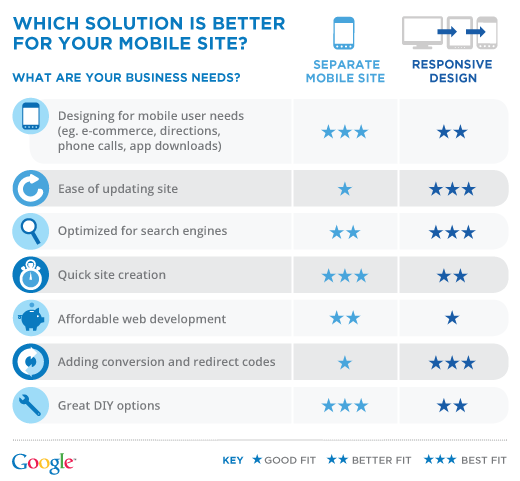
So how do I know if I should build a separate mobile website or use responsive design?
Here are some guidelines to help you decide what makes sense for your business:


If I decide responsive design is a better fit for my business, do I have to build my site from scratch?
Not necessarily. A sophisticated web developer might be able to adapt an existing site with responsive design, but there will still be costs in terms of time and budget.

Will a site built with responsive design have more than one URL?
No. A site built with responsive design will have the same URL for desktop, mobile and tablets. When building a separate mobile optimized site, typically there is a different mobile URL, but the users will be taken there automatically as long as your desktop site is enabled with the auto redirect code.

How much does it cost to use responsive design for mobile?
Prices vary across developers and agencies. We recommend reaching out to a developer and/or agency for help on getting started.

Responsive design can definitely minimize long term maintenance of your site, but many businesses can effectively connect with their customers with a separate mobile-friendly site. If you have the technical resources and a clear business need, then responsive design is a more advanced way to make your site mobile-friendly. No matter how you go about it, you need to ensure you are designing for mobile first, and engaging your customers when they're using their mobile phones to search for your business.

For additional resources on the value of mobile, testing your site and finding developers to help you build your mobile-friendly site, visit howtogomo.com.

Posted by Jessica Sapick, Associate Product Marketing Manager


--
Posted By Inside AdSense Team to Inside AdSense at 7/19/2012 06:50:00 AM

--
Unable to view the links or images in the message above? Want to comment on this post? Visit http://adsense.blogspot.com/ .
 
You received this message because you are subscribed to the Google Groups "Inside AdSense" group.
To unsubscribe from this group, send email to Inside-AdSense+unsubscribe@googlegroups.com
For more options, visit this group at http://groups.google.com/group/Inside-AdSense

Wednesday, July 18, 2012

[Inside AdSense] Manage your AdSense account with multiple users

Need to give AdSense account access to a business partner because you manage the account together? Today, we're happy to let you know that this top-requested feature has been added to the AdSense interface.

From now on, you can invite trusted colleagues or partners to sign in to your AdSense account and also run reports, manage payment information, and generate ad code. In addition, this new user management feature can also be used to change the Google Account login linked to an AdSense account.

We currently support two types of users on an account: Administrator and Standard user. Both types of users have full access to the AdSense interface, but only Administrators can add or remove users. As a publisher with an approved account, your access level for your account has now been set to 'Administrator'. You can invite other people to access your account, designate them as Administrators or Standard users, and later change these settings if needed.

Please note that when another person is invited to access an AdSense account, they'll need to use a verified Google Account login that isn't linked to any other AdSense account or application. In addition, please be aware that Google AdSense is unable to mediate access disputes between users. As a result, we recommend exercising caution when sharing account access.

You can learn more about inviting users and find answers to the most frequently asked questions from existing or invited users in our Help Center.

We hope that this feature will allow you to manage and share your AdSense account in a more efficient way. Feel free to share your feedback and suggestions on our Google+ page.

Posted by Nick Radicevic -- Product Manager


--
Posted By Inside AdSense Team to Inside AdSense at 7/18/2012 08:35:00 AM

--
Unable to view the links or images in the message above? Want to comment on this post? Visit http://adsense.blogspot.com/ .
 
You received this message because you are subscribed to the Google Groups "Inside AdSense" group.
To unsubscribe from this group, send email to Inside-AdSense+unsubscribe@googlegroups.com
For more options, visit this group at http://groups.google.com/group/Inside-AdSense

Tuesday, July 3, 2012

[Inside AdSense] Block ads on your site with the updated Google Publisher Toolbar

In January, we launched the AdSense Publisher Toolbar to help you save time and monitor account performance directly from your pages. If you're one of the over 31,000 publishers who have already installed this handy Chrome extension, you've probably noticed that we've renamed it to the Google Publisher Toolbar, as it now supports DoubleClick for Publishers as well. We've also been working on other major enhancements, and today we're excited to share them with you.

The biggest improvement you'll notice in the toolbar is the addition of blocking capabilities, enabling you to block ads as you're viewing your site. When you see an ad that isn't suitable for your audience, you'll be able to take action immediately without needing to navigate through your account or investigate which ad or URL to block.

Here's how it works, once you've installed the toolbar: Just as before, you can view account performance in a widget in the corner of your Chrome window, as well as ad overlays on the page itself. Clicking on one of the ad overlays will now bring up additional information about that ad unit, including the name of the ad slot, performance metrics, the destination and display URL of the ad, and a preview of the ad. Below the ad preview, you can take action on either the ad or the URL: If you are using the Ad Review Center, you can choose to block the ad directly and your action will be reflected the next time you visit the Ad Review Center. If you block a URL, it'll be added to your URL filter list.


Please be assured that clicking the ad overlays generated by the toolbar is permitted, and won't generate any invalid clicks. Also, keep in mind that blocking any ad will lower your potential earnings, as it reduces competition for your ad space by removing advertiser bids from the auction. It's a myth that filtering ads can prevent 'low-paying ads' from appearing, so as always, we recommend blocking only those ads that you feel are unsuitable for your users.

The Google Publisher Toolbar is now available in all AdSense languages, so we encourage all publishers to give it a try. If you're already using the toolbar, no action is needed on your part as it'll automatically update. Feel free to let us know your thoughts about the Toolbar on our AdSense +page.

Visit our Help Center for answers to questions related to the Publisher Toolbar, and stay tuned for more updates!

Posted by Gregory Block -- AdSense Engineering


--
Posted By Inside AdSense Team to Inside AdSense at 7/03/2012 09:40:00 AM

--
Unable to view the links or images in the message above? Want to comment on this post? Visit http://adsense.blogspot.com/ .
 
You received this message because you are subscribed to the Google Groups "Inside AdSense" group.
To unsubscribe from this group, send email to Inside-AdSense+unsubscribe@googlegroups.com
For more options, visit this group at http://groups.google.com/group/Inside-AdSense

Monday, July 2, 2012

[Inside AdSense] More control with “mute this ad” [x] icon

We're investing in many ways to give users control over the ads they see. On YouTube, our TrueView ad product enables users to skip video ads. On Google search, you can click "Why this Ad?" and stop sites you're not interested in from showing you ads. Our Ads Preferences Manager, available with one click on the AdChoices icon on ads on the Google Display Network, enables you as a consumer to edit your interest categories, or opt out of all interest-based ads including remarketing ads on our Display Network.

Over the next few weeks, we're introducing a small [x] which will appear in the corner of some display ads on the Google Display Network. When a user clicks the [x], he or she will no longer see ads from that campaign. We're starting by showing the [x] in ads that are based on remarketing and interest categories.

Users who click the [x] on an ad will be shown a confirmation page explaining that the advertisement has been muted, along with a link to the Ad Preferences Manager. The feedback this provides will also help improve our ads over time.

The muting is not a 100% guarantee you won't see that ad again as a consumer -- for example, the same ad could be shown by a different ad company, or the marketer could run a separate campaign targeting specific web content.  But we believe it's an early step in the right direction of giving users control over ads, while helping marketers and websites deliver ads that perform better.

We believe this early-look feature can bring benefits to the entire ecosystem: users have a way to control their experience and signal that they aren't interested in certain ads; advertisers are no longer paying to show ads to people who aren't interested; and publishers will receive better performing (and potentially more valuable) ads, and spend less time filtering out ads they think won't be of interest to their audience.

Online advertising underpins the web and supports millions of businesses. It's already unique in the level of control it can offer users. We're at the early stages of these innovations, with much more to come in months and years ahead.

Posted by -- Michael Aiello, Product Manager


--
Posted By Inside AdSense Team to Inside AdSense at 7/02/2012 09:15:00 AM

--
Unable to view the links or images in the message above? Want to comment on this post? Visit http://adsense.blogspot.com/ .
 
You received this message because you are subscribed to the Google Groups "Inside AdSense" group.
To unsubscribe from this group, send email to Inside-AdSense+unsubscribe@googlegroups.com
For more options, visit this group at http://groups.google.com/group/Inside-AdSense